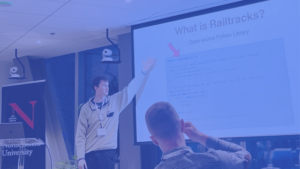
Railtown AI teamed up with BMEG and FIZZ, the student organizations for UBC’s School of Biomedical Engineering and UBC Engineering Physics, to host a hands-on workshop called Build Your First AI Agent. Over 50 students filled Design Studio 2 on the first floor of the Gordon B. Shrum building, laptops open and notebooks ready. The session was open to students from every program.
We didn’t want to stop at slides about what agents are. We wanted everyone to build one, step by step, and to see the moments where each new capability becomes necessary. We promised four things for the evening: an understanding of agentic AI from the ground up, hands-on time with Railtracks, a job search agent you get to keep, and a foundation you can carry into whatever you build next.
The project was a Career Copilot: an agent that reads a résumé, looks up a real job posting, gives feedback, remembers what it has seen, and finally produces a tailored résumé you could actually send. Each section of the workshop added one capability, using Railtracks, our open-source agentic framework, to wire it all together.
Starting at the bottom: what an LLM actually does
Before building agents, we looked at the thing they’re built on. Using a small script, we asked a model to continue the phrase “The cat sat on the” one token at a time and printed the top five candidates it considered at each step, along with their probabilities. Seeing the model weigh “mat” against its alternatives makes it concrete that an LLM is a next-token predictor, nothing more mysterious.
From there we played with temperature. At zero, the model always picks the most likely token. Crank it toward two and the output gets noticeably more creative, and noticeably less reliable. It’s a small experiment, but it sets up an important idea for later: the same input doesn’t always produce the same output.
What turns an LLM into an agent
An LLM on its own is passive. It can only produce text from the prompt you hand it. It can’t look anything up, run code, or take an action. An agent wraps the model in a loop and gives it three extra abilities:
- Tools, so it can call a function (search the web, read a file, query a database) instead of just replying.
- Iteration, so tool results feed back into the model, which decides what to do next until it’s finished.
- Memory, so it can carry state across steps. The model itself is stateless, and every API call starts from scratch.
In short: an LLM predicts text, and an agent is an LLM plus a control loop plus tools it can reach for.
Step 1: A chatbot that confidently answers anyway
We started with the simplest possible agent: a system message, a user message, and a résumé attached as a PDF. The sample résumé belonged to “Thomas Kent” We asked the agent to critique it against a job posting URL.
The feedback read well. Then we asked everyone to open the posting in a new tab and compare.
This agent had no web access and no tools. All it ever saw was a sentence and a PDF. So either it admitted it couldn’t open links, or it described the job anyway, confidently, from whatever it absorbed in training about similar roles. Parts of that description might even be right, which is the dangerous part.
This was probably the most important lesson of the evening: the agent couldn’t do what we asked, and nothing stopped it from answering. There was no error and no warning, and the output looked exactly like every other answer. A model’s confidence tells you nothing about whether it actually had the information.
We also used this step to explain the difference between the system message and the user message. The system message holds standing instructions that apply to every call. The user message holds the specific request. A handy rule of thumb: if you’d have to rewrite it for the next résumé, it belongs in the user message.
Step 2: Give it a tool
The fix for Step 1 is a tool. Railtracks ships prebuilt toolsets, so adding web search took one line: passing the search tools into the agent’s tool_nodes. Toolsets also come with their own suggested system-message guidance, and we had participants try appending it to see whether the agent searched differently.
Now the feedback was grounded in the real posting instead of a plausible guess.
Step 3: Memory is something you build
Memory in agent systems isn’t a feature you switch on. It’s an abstraction you design, ranging from “resend the whole conversation” to vector databases with retrieval. We briefly covered the common categories (working, episodic, semantic, and procedural), then deliberately skipped the hard parts and built a simple version by hand.
Our memory was three ordinary Python functions and a file:
@rt.function_nodedef store_memory(key: str, note: str) -> str: """ Store a memory with key and value Args: key: Key for the memory entry note: The note to remember about this entry. """ ...
store_memory, we wrote inspect_memory and retrieve_memory, then told the agent to save relevant details from each posting and check its memory before giving feedback on a job it had already seen.
This step also introduced custom tools, and with them the one rule you can’t skip: type hints on every parameter and a clear docstring. Railtracks turns both into the schema the model reads when deciding whether to call a tool. The docstring isn’t documentation for you. It’s the interface for the model, and a vague docstring is the most common reason an agent ignores a tool you gave it.
Once everyone had built memory by hand, we showed that Railtracks also ships a prebuilt key-value memory toolset that does the same job, plus search and deletion.
Step 4: Structured output instead of paragraphs
output_schema, we had an agent extract job requirements into typed fields: title, must-have skills, nice-to-have skills, and years of experience. The result came back as a real Python object that you can branch on, not a blob of text you have to parse.
Field descriptions matter here for the same reason docstrings did. The model reads them. A field described as “skills the posting lists as required, not preferred” gets noticeably better results than a bare list of strings.
We also covered a practical gotcha. The fix is to split the work: one agent searches and answers in prose, and a second agent with no tools reshapes that prose into the schema. As a bonus, you can print the intermediate text and see whether a failure came from the search or the extraction.
Step 5: More agents, but you decide the order
The tempting next move is to keep piling tools onto one agent. That works until the system message starts pulling in different directions and the model stops reliably picking the right tool.
The alternative is to split the work across specialists. The key idea is that, from the caller’s point of view, another agent is just a tool. We built a Job Researcher that only searches and a Résumé Critic that only compares. The critic never gets web access, and the researcher never sees the résumé.
Then we asked the more important question: who decides which agent runs when? An LLM orchestrator is flexible, but it’s non-deterministic and costs an extra model call just to route. When you already know the order, you don’t need one. Your entry point can be a plain function:
@rt.function_nodeasync def career_copilot(job_url: str) -> str: requirements = await rt.call(JobResearcher, f"What does this job posting ask for?{job_url}") critique = await rt.call(ResumeCritic, ...) return critique.content
We were also honest about the tradeoffs. Every extra agent is another LLM call, context gets lost at each handoff, and debugging gets harder. Our rule of thumb: keep one agent until you can point to the specific thing it’s doing badly.
Step 6: Actually changing the résumé
Everything up to this point talked about the résumé. The final step produced a new one, using a three-stage pipeline:
- An agent converts the PDF résumé into LaTeX.
- An agent tailors that LaTeX to the extracted job requirements.
- A plain Python function compiles the LaTeX back into a PDF.
LaTeX sits in the middle because an LLM can’t edit a PDF, but it can edit text. The compile step is deliberately not an agent. Turning LaTeX into a PDF has exactly one correct answer, and a compiler already knows it. The principle we kept returning to all evening: use an agent where there’s a decision to make, and a plain function everywhere else.
The tailoring agent’s instructions were strict. It could reorder and reword real experience using the posting’s vocabulary, but it could never invent employers, titles, dates, tools, or metrics, and any requirement the résumé didn’t support stayed missing. Every edit was wrapped in blue text, so a human could review exactly what changed before sending anything.
Thank you, and keep building
A big thank you to BMEG and FIZZ, the Biomedical Engineering and Engineering Physics student organizations at UBC, for partnering with us, and to every student who came out and built along with us.
If you want to keep going, you can find the docs at docs.railtracks.org, the source on GitHub, and the team on Discord. The workshop API token has expired, so swap in your own key to keep your agent running. We’d love to see what you build.